Module · Fleet and records
Automatic mileage capture and control over how the fleet is used
FleetSoft collects the mileage of every car straight from Uber, Bolt and FreeNow and turns it into a mileage record — including the months when one car was shared by several drivers on shifts. Instead of reconstructing figures from memory and statements, you download a finished document.
crm.fleetsoft.pl
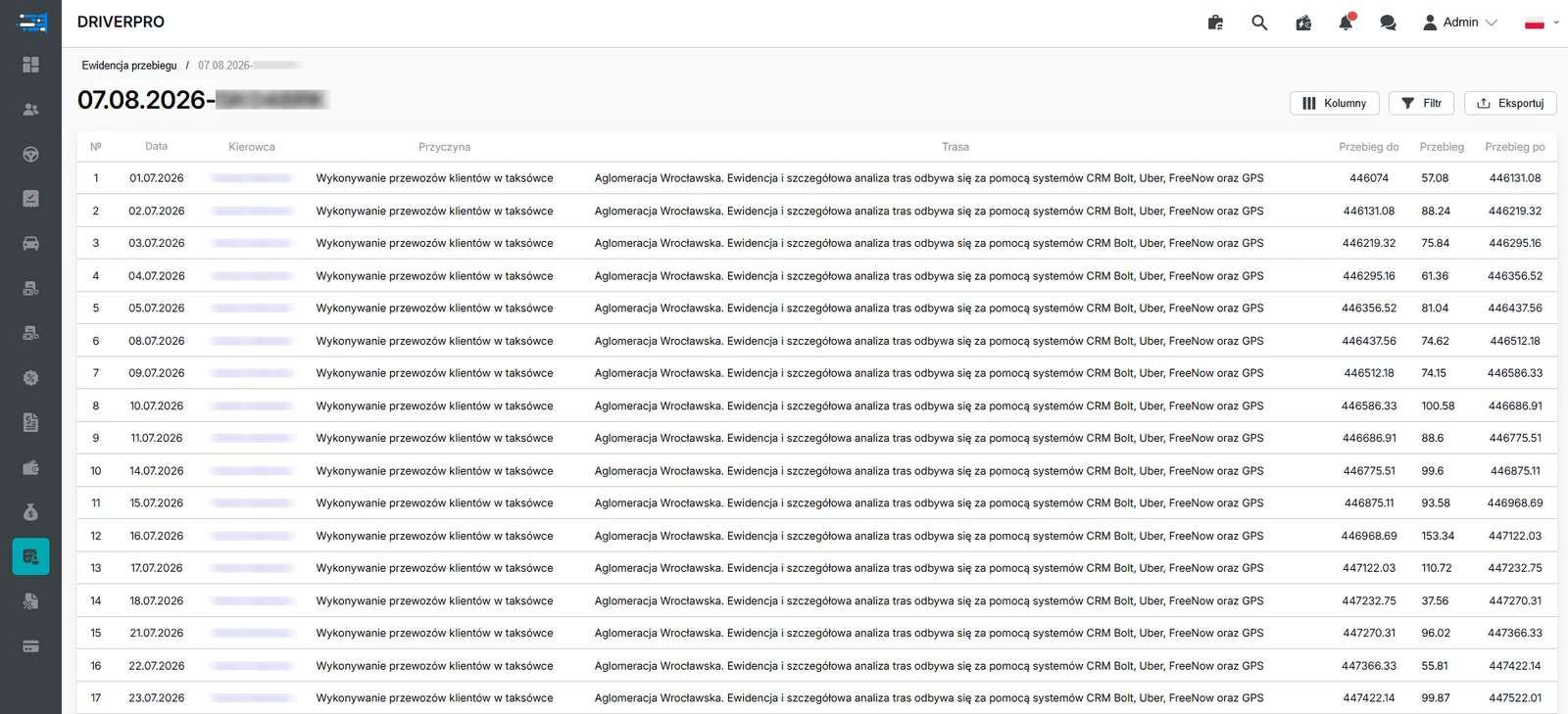
Vehicle mileage log: date, driver, trip purpose, route and odometer readings. Personal data hidden.
Why a fleet needs vehicle mileage records
A mileage record is a document showing how much and when a particular car was driven. Fleets that own their vehicles reach for it when they have to justify fuel and depreciation costs to the Urząd Skarbowy (the Polish tax office), and also when the cars work with partners and the fleet has to show how they were actually used.
The problem is rarely an unwillingness to keep such a record. The problem is that the mileage data sits scattered across aggregator apps, and one car often has several people driving it in shifts over a month. Reconstructing that by hand, after the fact, is slow work and always leaves room for doubt. The Usage Fleet module collects the data as it happens, so the document builds itself instead of being assembled in the last week of the month.
A report for the owner, not only for accounting
Mileage records bring a side benefit that turns out to be very practical: a full picture of what is happening with the fleet. The fleet-wide mileage report shows downtime, ride and repair statistics for the whole car park in one place.
On top of that come profitability charts that an owner or director can read without an analyst. They show which cars are working, which spend too long in the workshop, and where the kilometres driven do not turn into revenue. That is material for concrete decisions: sell a car, change the driver, move a vehicle to another city or grow the fleet.
The data comes from the same source as the mileage record, so the management report and the mileage documentation always say the same thing. There is no situation where accounting counts one set of kilometres and the director looks at another.
Frequently asked questions
Where does the system get mileage data from?–
Straight from the integrations with Uber, Bolt and FreeNow. Each car's mileage flows into the system in real time, so there is no need to read odometers or ask drivers for reports.
What does a vehicle mileage record look like when several drivers share one car?+
The system lists in chronological order every driver who drove that car in the chosen period and calculates the distance separately for each of them. It is not just information about the last person behind the wheel.
Does the module replace an accountant?+
No. FleetSoft collects the data and prepares documents evidencing vehicle mileage. Deciding what documentation your company needs is a matter for your accountant or tax adviser.
What does the fleet-wide mileage report contain?+
Downtime, ride and repair statistics across the fleet, plus profitability charts prepared with the director and the owner in mind — readable without extra analysis.
Is the module useful for a fleet without its own cars?+
It gives the most value to fleets that own their vehicles, because they are the ones documenting how the cars are used. If you rent cars to drivers or partners, the record helps you control how they are driven and keeps the mutual settlements in order.